Website Builder for Sushi Restaurants — Get Online in 15 Minutes
Create a clean, elegant sushi restaurant website with your menu, omakase options, and photos. Built for sushi bars and Japanese restaurants — minimalist templates, free to start.
Why Sushi Restaurants Need a Different Kind of Website Builder
Sushi is visual — your website needs to match the precision of your food
Sushi is as much about presentation as taste. A cluttered, poorly designed website undermines the perception of quality and care that sushi commands. Your website needs clean lines, thoughtful spacing, and food photography that does justice to your nigiri.
Your menu ranges from simple to complex
Sushi menus span from straightforward (nigiri by the piece) to elaborate (omakase progression, sushi/sashimi combinations, kitchen entrees). The website needs to present both simplicity and complexity without overwhelming customers.
Dietary and allergen information is critical
Raw fish, shellfish, soy, gluten (soy sauce) — sushi restaurants have more dietary considerations than most. Clear allergen labeling and dietary tags aren't optional; they're essential for customer safety and trust.
The Best Template for Sushi Restaurants

Minimalist
The Minimalist template mirrors the aesthetic of great sushi — clean, precise, and focused. White space lets your food photography breathe. The uncluttered layout matches Japanese design sensibilities and puts full attention on the menu.
Try This Template FreeOther Templates That Work for Sushi Restaurants

Fine Dining
For high-end omakase-only sushi bars with a dark, intimate atmosphere. The dark theme creates drama and exclusivity — appropriate for $150+ tasting menus.
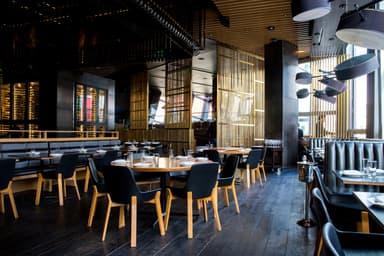
Modern Bistro
For contemporary sushi restaurants that also serve hot Japanese dishes (ramen, katsu, teriyaki) — a balanced template that handles both sushi and kitchen menus.
Features That Matter for Sushi Restaurants
Clean, minimalist design
Matches the aesthetic expectations of sushi customers. Clean lines, white space, and precise typography communicate the care and precision of your kitchen.
Allergen & dietary labeling
Mark items containing raw fish, shellfish, soy, and gluten. Add vegetarian/vegan tags for plant-based rolls. Clear allergen info builds trust and prevents issues.
Flexible menu formatting
Nigiri by the piece, rolls, sashimi combinations, omakase progression, kitchen entrees — format each category differently as your menu requires.
Photo showcase
Sushi is one of the most photographed foods. Large, crisp images of your sushi and sashimi platters sell the experience better than any description.
Sushi Restaurants Owners: We Heard You
Real pain points from restaurant owners — and how InstantCafeSite solves them.
The Problem
“We need to present omakase and à la carte separately”
How We Solve It
Create separate categories: "Omakase" (with course descriptions and pricing tiers) and "À La Carte" (nigiri, sashimi, rolls, kitchen). Each displays independently on your menu page.
The Problem
“Allergens are critical for us — we need them clearly labeled”
How We Solve It
Every menu item supports dietary tags (gluten-free, vegetarian) and a dedicated allergens field. Mark "contains raw fish" on appropriate items. Give customers the information they need to order safely.
The Problem
“We're a small sushi bar — no budget for a custom website”
How We Solve It
The free tier gives you a professional, clean website that matches sushi aesthetics. Upgrade to Pro ($29/month) for a custom domain and unlimited menu items when you're ready. Either way, you're online today for less than the cost of one omakase.
What This Means for Your Budget
Sushi restaurants range from neighborhood spots to high-end omakase bars. Free tier works great for smaller sushi shops getting established. Pro at $29/month adds a custom domain and unlimited menu items — less than the cost of a single omakase course. For high-end sushi bars, the Fine Dining template at $29/month looks like a $5,000 custom design.
Frequently Asked Questions
How do I handle omakase pricing on my website?+
Can I mark which items contain raw fish?+
Ready to get your sushi restaurants online?
Free to start, no credit card. Pick the Minimalist template, add your menu, and publish — all in about 15 minutes.